The County of San Diego is nice enough to provide free sandbags to folks that live in the unincorporated areas. Great on days like today when we get the first real rain of the season - or for people that still have fire scares on their property, etc.
The County website has additional information here: http://www.countynewscenter.com/news/county-giving-free-sand-bags-residents
Quickly you will see that there are seven locations. There are partial addresses and no map to help you get your bearings.
I decided to map it out. I did a little copy/paste work putting the location info into a CSV file. Loaded that up into ArcGIS Explorer Online to geocode the locations and do some editing of the icons and such. Dropped that into the ArcGIS.com Map Viewer and shared it out publicly, and also generated the HTML code to pop into this quick blog post.
Now I know where to go in Valley Center if I should need some sandbags!
View Larger Map
Hopefully I won't need them, but if I do...
Friday, November 04, 2011


Thursday, May 05, 2011
GIS Managers' Open Summit - Esri UC 2011
Did you attend the Esri User Conference (UC) last year? Did you make it to the GIS Managers' Open Summit? It was an interesting day, and our first time having an unconference as part of the UC. Most of the folks there were not really familiar with the idea of an unconference or how it works, but they all survived and I think most got a lot out of it.
At the end of the day I asked Victoria if she thought we would do this again next year. She didn't know, but hoped we would. I had to agree.
Well, here we are a year later. And guess what? Not only are we doing the Open Summit again - but we are doing it over two days! Tuesday and Wednesday, with a few twists to the schedule, and a few little changes from last year.
More to come on that. Watch for Tweets on the subject - specifically follow @geoTC and @VKouyoumjian for updates on Open Summit. Also follow @EsriUC for all things UC.
So plan on coming by for a day, or a morning, or an afternoon. We would love to see you there. If you would like to add it to your "My UC" agenda - here's the link: http://events.esri.com/uc/2011/infoweb/onlineagenda/?fa=ofg_details_form&ScheduleID=2096 for Tuesday. Then at the bottom for that page is the link for Wednesday.
You can also follow along and keep the conversation going on the LinkedIn 'Managers in GIS' group.
Look forward to seeing you there, hearing about your work, and discussing all things GIS in an unconferency way.
At the end of the day I asked Victoria if she thought we would do this again next year. She didn't know, but hoped we would. I had to agree.
Well, here we are a year later. And guess what? Not only are we doing the Open Summit again - but we are doing it over two days! Tuesday and Wednesday, with a few twists to the schedule, and a few little changes from last year.
More to come on that. Watch for Tweets on the subject - specifically follow @geoTC and @VKouyoumjian for updates on Open Summit. Also follow @EsriUC for all things UC.
So plan on coming by for a day, or a morning, or an afternoon. We would love to see you there. If you would like to add it to your "My UC" agenda - here's the link: http://events.esri.com/uc/2011/infoweb/onlineagenda/?fa=ofg_details_form&ScheduleID=2096 for Tuesday. Then at the bottom for that page is the link for Wednesday.
You can also follow along and keep the conversation going on the LinkedIn 'Managers in GIS' group.
Look forward to seeing you there, hearing about your work, and discussing all things GIS in an unconferency way.
Tuesday, January 11, 2011
Metadata in ArcGIS 10
I have had some clients asking about the changes in the way Esri is handling Metadata in ArcGIS 10. If you missed the session at the 2010 User Conference then you will be extra interested in this new series of blog posts related to the topic.
A new approach to Metadata with ArcGIS 10 (part 1)
A new approach to Metadata with ArcGIS 10 (part 2)
Be sure to review the comments and replies as there is additional or updated information contained there.
More to come!
Wednesday, December 22, 2010
Developer Code Challenges – Light It Up!
Sent this note out to some clients, and thought others might be interested as well, so thought I’d share…
There are two developer coding contests happening that you may be interested in.
The “Flex-A-Widget Challenge” – build a widget for the Flex viewer, share it on ArcGIS.com and submit your entry. Winners announced at DevSummit.
http://www.esri.com/events/devsummit/get-involved/widget-challenge.html
And the “Light Up the Night Challenge” – happens at the DevSumit along with Microsoft developers. You will be given a challenge at the event – you code a solution.
The prizes for both are pretty sweet.
http://www.esri.com/events/devsummit/get-involved/lightup-challenge.html
---
OK – So I didn’t say “pretty sweet” in my email… =)
These look like some great opportunities to show off your programming skills!
Wednesday, December 08, 2010
Wednesday, September 08, 2010
Get rid of it!
Been seeing this abandoned truck on the side of the road for about 3 months. Doors off, a real mess – who knows how long it has been sitting there. Looked like a real long time.
I finally had a chance to pull over and make a CitySourced report about it on Sept 5th.
Here is my report with photo to CitySourced: http://www.citysourced.com/report/6906/abandoned-vehicle
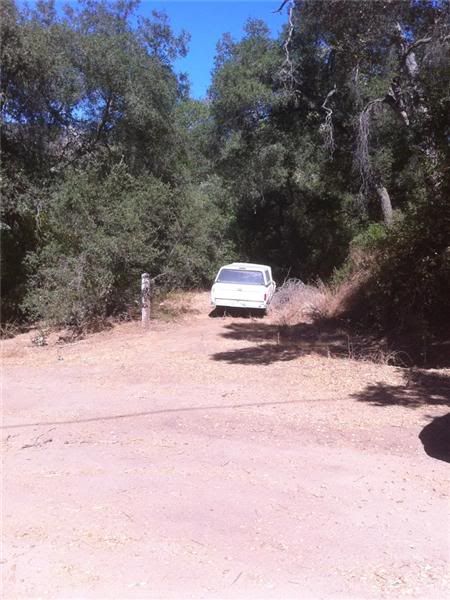 Abandoned Vehicle - Issue Reported in Valley Center, CA
Reported On: 09/05/2010 @ 03:04 PM
Reported By: Anonymous
Address: 29845-29999 Anthony Rd, Valley Center, CA 92082, USA
Latitude: 33.251583
Longitude: -117.050011
Direction: North
Description: Truck about 60 feet east of Anthony Road. Looks like it has been here a long time.
Device: Apple iPhone 4
Current Status: Submitted
I drove by the spot 2 days later and noticed that it was gone!
Was totally (happily) surprised to see it gone. Fantastic! I had hoped my report would lead to it being taken away, but didn’t think it would be so fast.
Take a look at CitySourced and help make your community a better place by reporting issues around your neighborhood: http://www.citysourced.com/
Happy CitySourcing!
Friday, July 16, 2010
Monday, July 12, 2010
Esri User Conference – UC 2010
The first day of the 30th annual Esri International User Conference is about 1/2 over now. It has been a great morning of user stories, product demos and vision discussion.
Keep up-to-date on all the happening on the Esri UC Insider page: http://blogs.esri.com/Info/blogs/ucinsider/default.aspx
Looks like they are doing a great job keeping this in sync with all the activities as they happen!
Watch all the action on Twitter for minute-to-minute updates! #EsriUC
Monday, June 07, 2010
WhereCamp SoCal is on! July 17/18 2010
In case you missed the multiple Tweets and a few blogs posts about it today, the WhereCamp SoCal event is now set for date and location:
July 17 & 18, 2010 (this is the Sat/Sun) directly after the ESRI User Conference at San Diego State University (SDSU) in the Adams Humanities building. Specific details to come. This is right next to the San Diego Trolley so use public transportation when you can.
Check out the official site for updates: http://www.wherecampsocal.org/
We are still taking sponsors if your company might be interested – let us know at info@wherecampsocal.org or join the Google Group and add to the conversation: http://groups.google.com/group/wherecamp-socal. You can also follow on Twitter @WhereCampSoCal
Keep an eye on the blog for quick updates if Twitter isn’t your thing: http://blog.wherecampsocal.org/
Hope to see you there!
Thursday, April 22, 2010
WhereCamp SoCal – where? when?
You may have heard Twitter (@ortelius / @geoTC / @wherecampsocal) about a Geo WhereCamp in the southern California area. Well, you heard right.
Debate is still open about date & location. We are going to pick a location and date soon – so if you have any input let us know now. Pop us a Tweet at @geoTC & @ortelius with your ideas!!
Monday, March 22, 2010
Some ArcGIS 10 Tips from Crystal Dorn
Not everyone gets to spend time in Palm Springs at the ESRI Developer Summit (on Twitter @ESRIDevSummit and follow Hashtag #devsummit). Included in that group with you and me is Crystal Dorn from the CA/HI/NV Regional Office (on Twitter @CrystalDorn).
One thing we have seen year after year is that clients love to see Crystal’s Usability Tips & Tricks demos at meetings and conferences. So when she told me she was going to Tweet some tips from ArcGIS 10 (#ArcGIS10) I decided that I would RT them out as well. And for you folks not on Twitter for whatever reason, I thought it might be nice to gather them all up in one blog post too! So here you go…
@CrystalDorn: Love it! Searching for symbols super easy & faster, e.g. "Hazmat RED" lists all hazmat red symbols! #ArcGIS10
@CrystalDorn: Select by Lasso on the new Selection Tools where have you been my whole ArcMap life? Sometimes it's the little things! #ArcGIS10
@CrystalDorn: ArcMap Table container window lets attribute table be docked side-by-side or opened via tabs - great feature! #ArcGIS10
@CrystalDorn: Woohoo can change edit sketch (vertex, segments, etc.) symbology now in Editor options! #ArcGIS10
@CrystalDorn: ...and can select multiple vertices! New Edit Vertices toolbar will be a popular feature of #ArcGIS10
I think Crystal is on the road tomorrow, so probably no new tips. I’ll keep an eye out though, and if she starts up again I will RT and post them here.
Thursday, January 21, 2010
ESRI Tools & Resources for Haiti (& other) Response Efforts
Updated: Jan 21, 2010:
TwitterSearch Flex viewer Widget: http://resources.esri.com/arcgisserver/apis/flex/index.cfm?fa=codeGalleryDetails&scriptID=16782
The idea for this widget came about at the Random Hacks of Kindness event in CA back in Nov 2009. The BarCamp discussions had a lot of talk about crowd-sourced information, especially Tweets. We weren’t able to complete the code for this widget at the event, but now it is ready for prime time (well, beta prime time). It is a multi-fuction widget in that you can search for Tweets within a draw radius area (like around the island of Haiti), and you can also filter your radius search results by up-to three keywords or hashtags. This widget also allows you to send Tweets, and even better – geo-locate those Tweets. So if you are Tweeting about something happening somewhere else, you can locate the Tweet in that area. Widget is also ready to go in the GEO Viewer. Thanks Andy!
Updated Imagery available via ArcGIS Online:
NOAA imagery (Jan 20): http://www.arcgisonline.com/home/item.html?id=2c570d9fcda24f4085e55bd8d8f1eeda
Bing Maps, Digital Globe imagery (Jan 18): http://www.arcgisonline.com/home/item.html?id=6e4d40bc81dd4e70b265a4aa22961a79
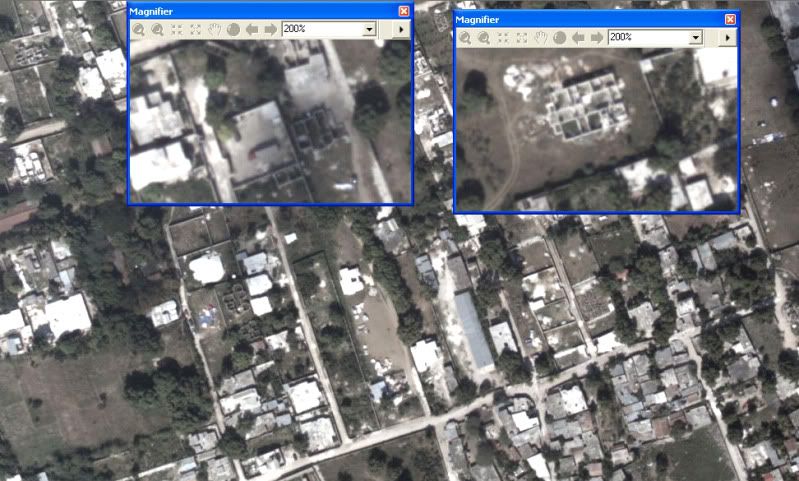
Updated: Jan 20, 2010:
Accessing OpenStreetMap data within ArcGIS to support the Haiti Earthquake Response: http://blogs.esri.com/Dev/blogs/publicsafety/archive/2010/01/20/Accessing-OpenStreetMap-data-within-ArcGIS-to-support-the-Haiti-Earthquake-Response.aspx
This post on the ESRI Public Safety blog discusses how you can use OpenStreetMap data in ArcGIS Desktop. With all the work being done on updating these data post-earthquake, this is useful information.
Free Flex Sample viewer: http://resources.esri.com/arcgisserver/apis/flex/index.cfm?fa=codeGalleryDetails&scriptID=15905
This sample viewer allows you to build a website without needing ArcGIS Server. It hits freely available ArcGIS Online data and allows for some viewer customization via configuration files, so no need to compile code. You can also deploy some of the free widgets available from the Resources pages. Some examples of widgets you may like to include are:
- Twitter Geospatial Search Widget (draw a radius on the map to retrieve geo-located Tweets within that area): http://resources.esri.com/arcgisserver/apis/flex/index.cfm?fa=codeGalleryDetails&scriptID=16448
- Google Streetview Integrated with AGS Flex API (click on the map to grab Google Streetview at that location): http://resources.esri.com/arcgisserver/apis/flex/index.cfm?fa=codeGalleryDetails&scriptID=16070
GeoEye Image Service published in the Amazon Cloud: http://events.arcgisonline.com/ArcGIS/rest/services/GeoEye_Haiti_Jan13/ImageServer
More services: http://events.arcgisonline.com/ArcGIS/rest/services
January 13 GeoEye imagery as an Image Service for REST, SOAP or WMS access
Tools available from ArcScripts for working with OpenStreetmap data: http://arcscripts.esri.com/scripts.asp?eLang=&eProd=&perPage=10&eQuery=openstreetmap
Query on ArcScripts for OSM related entries.
Free tools and widgets available for your mapping websites:
- Flex: http://resources.esri.com/arcgisserver/apis/flex/index.cfm?fa=codeGallery
- Silverlight: http://resources.esri.com/arcgisserver/apis/silverlight/index.cfm?fa=codeGallery
- JavaScript: http://resources.esri.com/arcgisserver/apis/javascript/arcgis/index.cfm?fa=codeGallery
- .NET: http://resources.esri.com/arcgisserver/adf/dotnet/index.cfm?fa=codeGallery
- Java: http://resources.esri.com/arcgisserver/adf/java/index.cfm?fa=codeGallery
These are all part of the user communities for each product. ESRI supports and encourages the sharing of code through these community pages.
Original Post Jan 15, 2010:
Geo Status Widget for Flex Viewer: http://resources.esri.com/arcgisserver/apis/flex/index.cfm?fa=codeGalleryDetails&scriptID=16686
This widget allows you to geo-locate a Tweet. So if you want to reference a Tweet to an event or location without being there, this is one way to do that via clicking on a map to select the location. This widget was developed onsite at the Random Hacks of Kindness event Nov 2009.
ArcGIS Online Haiti Earthquake: http://www.arcgisonline.com/home/group.html?owner=esri_event&title=Haiti%20Earthquake
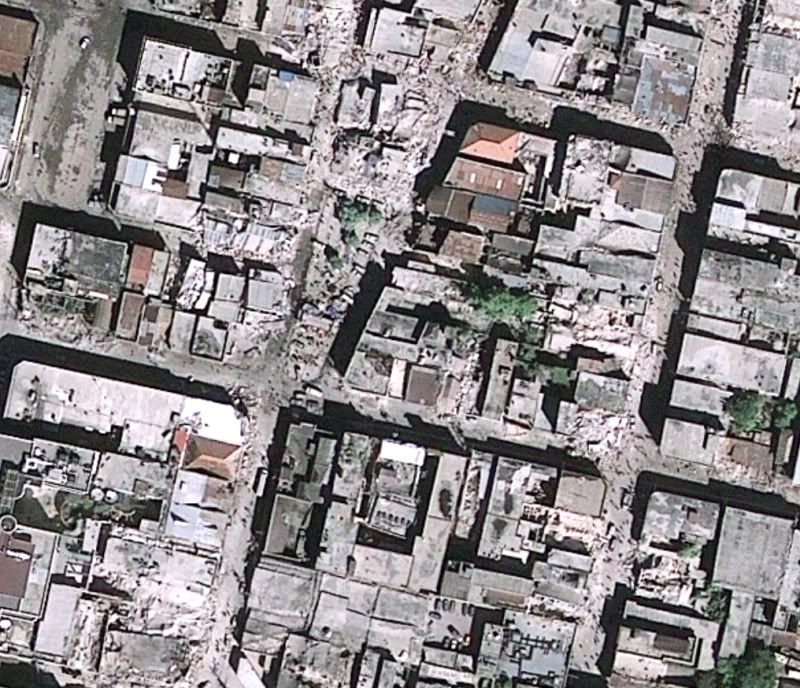
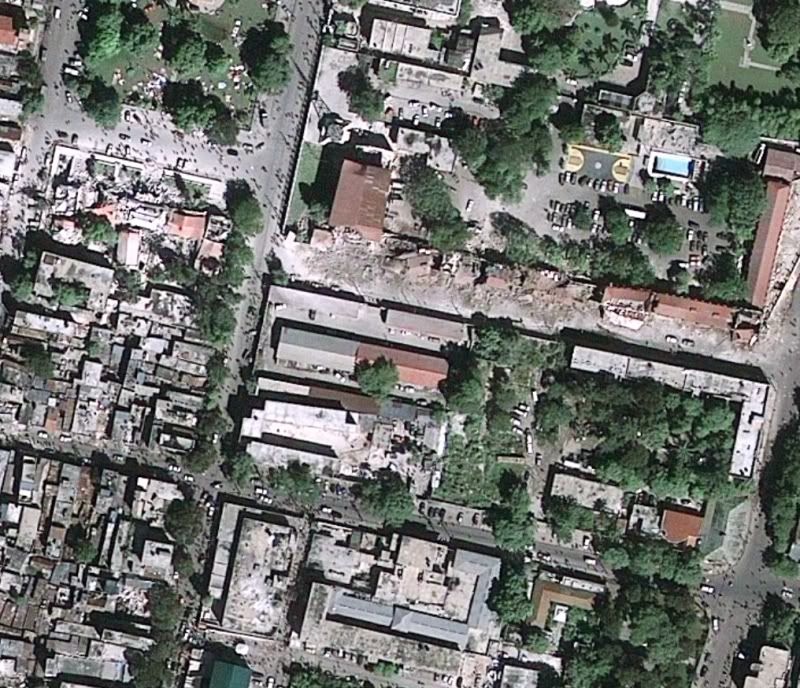
Free data and information related to Haiti and earthquake including post-event imagery from GeoEye (as a layer, in a map document, or as a web app for data download – see samples of imagery below). Click on the Content tab to see what is available. Update 1-20-10: Data are continually being added here. When I first made this post there were 7 items, today there are 24 – keep it coming!
Add Additional Data to ArcGIS Online: http://blogs.esri.com/Support/blogs/arcgisonline/archive/2010/01/15/adding-content-to-arcgis-online.aspx
So you have access to some data or maps related to the Haiti Quake and are wondering how you can share it? The post linked above steps you through the process with ArcGIS Online.
Geoss Viewer: http://geoss.esri.com/geoviewer/
Follow Tweets within a drawn radius area, display geoRSS feeds from USGS and other groups, compute population within drawn area, and more.
Disaster Response and Assistance: http://www.esri.com/services/disaster-response/earthquakes/index.html
Free temporary software, data, imagery technical support and other resources to help people supporting the disaster response and recovery efforts in Haiti.
Web APIs free for non-commercial use: http://resources.esri.com/arcgisserver/index.cfm?fa=applications
These web API’s allow you to pull data from the Cloud and mash it up with other sources of data. Pick your flavor – Flex, Silverlight, JaveScript, .NET, or Java.
ArcGIS Online data for Desktop use or Web use – no cost for non-commercial use (Standard services): http://www.esri.com/software/arcgis/arcgisonline/map-services.html
Imagery, streets, political, etc – global data
World Geocoding and World Routing available as Task Services – no-cost for non-commercial use: http://www.esri.com/software/arcgis/arcgisonline/task-services.html
Use in ArcGIS Desktop or free web mapping APIs
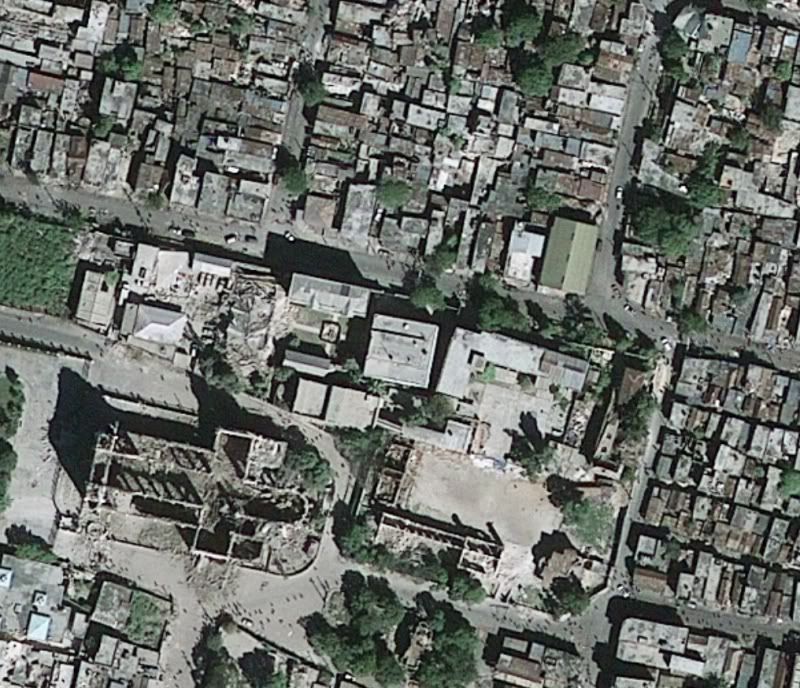
Sample images from GeoEye imagery of Haiti, post Jan 2010 earthquake (click for larger image)
Monday, January 11, 2010
This One’s a 10
ESRI made an announcement late today, and word has spread fast. 9.4 has been renamed to be version 10.
Here is the official announcement as a podcast from Jack, where he describes why this decision was made and he discusses some of the features included in 10 and why it justified a full version number. http://www.esri.com/news/podcasts/audio/speaker/dangermond_arcgis10.mp3
Listen to the podcast, and also view the What’s Coming page for ArcGIS 10: http://www.esri.com/software/arcgis/whats-new/whats-coming.html
From the traffic I’ve seen on Twitter a number of folks have blogged on this topic already, and it seems that no one is shocked or too questioning this version number change. Lots of good stuff in version 10.
The beta program is still open – talk to your ESRI representative for more information.
Some other blogs posts to review (I’m sure there will be many more tomorrow):
http://blog.gisuser.com/?p=5891&utm_source=twitterfeed&utm_medium=twitter
http://www.spatiallyadjusted.com/2010/01/11/arcgis-9-4-is-now-arcgis-10/
Wednesday, December 09, 2009
Bye Bye Geography Network
After a nine-year run, the Geography Network will be closing up shop at the end of 2009.
With so much data on ArcGIS Online with multiple ways to access it and so many other web services available, ESRI has decided the time has come to shut it down.
Here’s the blog post about it: http://blogs.esri.com/Support/blogs/arcgisonline/archive/2009/12/09/geography-network-to-retire.aspx
Thursday, August 20, 2009
DEPRECATION PLAN FOR ARCGIS 9.3.1 AND ARCGIS 9.4
It is time to start thinking about your back-end systems and development environments and OS’s and…
New document just released to the ESRI Support pages that discusses platform changes at the current 9.3.1 release, and the next release – 9.4.
It will be interesting to see what parts of the changes at 9.4 get the most interest (Noise? Worry? Joy?) from clients, and also in the social networking realm – especially Twitter.
See Technical Article 37113 for more details.
Friday, May 22, 2009
What’s a GIS Developer To Do @ UC??
Are you a GIS Developer (or hope to be one when you grow up?)?
Are you going to be at the User Conference this year?
Are you looking at the ginormous UC agenda and getting eye strain?
Not sure what to search for in the Online Agenda?
Fear no more – your friends at the ArcGIS Developer Blog have done the heavy lifting for you!
They have boiled down the agenda and come up with this Road Map for the 2009 User Conference, focusing on workshops and sessions that are focused on topics that you, as a GIS Developer, might be interested in. Looks like they missed the Thursday Night Party and the Map Gallery Opening – but you all don’t care about those social events do you? =)
Hope you have a great time at the UC – tons of fun and a lot to learn.
Map Templates Resource Center
You might be interested in reviewing what is now available at the ESRI Resource Centers Map Template Gallery.
As described in this blog post on the Mapping Center blog, these templates are not simply an MXT as you might expect. These templates are ZIP files that include an example map (.MXD) so you can see how a map was made, some sample data so you can see the structure of the data, and documentation as well so that all levels of GIS users will know where to start and what tasks are needed. Some of the templates will also include things like GP tools/models or maybe an example web app and code.
Take a look – currently I am seeing templates for Topo at varying scales, Geologic, Street Map, and Reference Map. Hopefully we will see all of you out there in the Community begin to add your template examples as well!
Tuesday, May 19, 2009
Tweet Tweet
Been using Twitter now for a few months. “Micro-Blogging” yet so very different from a blog. Been through a few desktop applications to better my Twitter experience, but was still using http://twitter.com when out and about on my Windows Mobile device. I knew there had to be something better.
Where to turn? To Twitter of course! I had seen folks Tweeting about different applications for the Blackberry – then did see a series of Tweets about Windows Mobile – this is where I learned about Twikini.
So I grabbed the beta and liked it right away. Easy to use, and code updates often with new features. I’m really liking it. Be sure to check out the menus as there are lots of features in there. Also see the main features here.
You can even add your location information to your Tweets:

If you are on Twitter and have a Windows Mobile device, I recommend that you take a look at Twikini. Oh ya – if you are interested in following me, I am @Tim_Craig
Friday, May 01, 2009
Jack Interview-O-Rama
Lots of interviews with Jack Dangermond, Founder and President of ESRI this week.
Government Technology (GovTech) - http://www.govtech.com/gt/articles/652976
O’Reilly radar had a three-part interview:
Part 1 of 3: Web Mapping
Part 2 of 3: Sharing Government GIS Data
Part 3 of 3: The GeoWeb
Monday, April 13, 2009
GIS in the Survey World
Brent Jones from ESRI delivering the keynote address “Why GIS Needs Land Surveyors” at the 2nd annual Carlson User Conference (2009).
Subscribe to:
Posts (Atom)

 Posts
Posts

